AI kitchen design.
Start with your space.
Explore cabinet finishes, countertops and lighting from a photo of your kitchen.
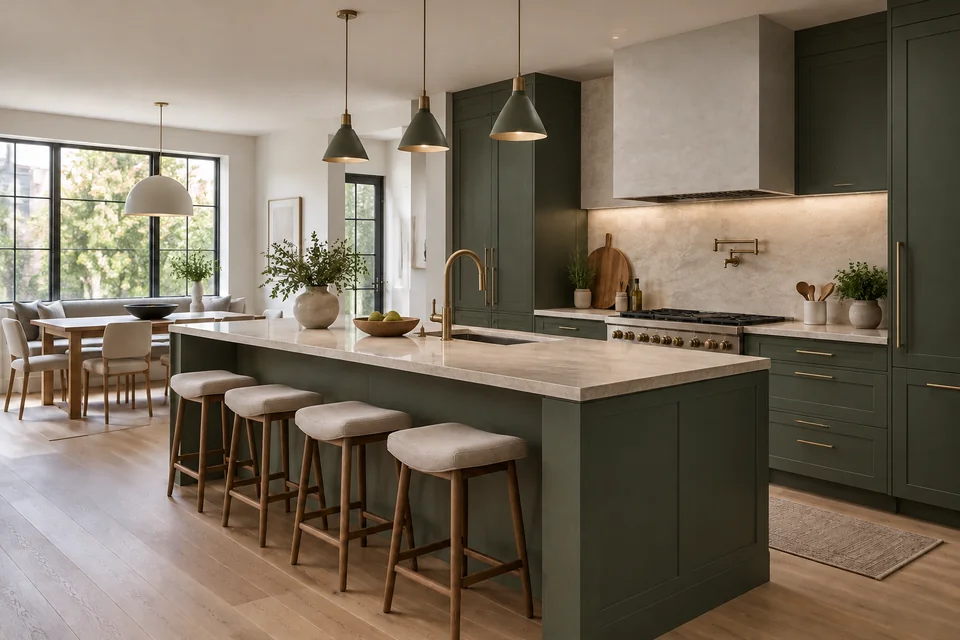
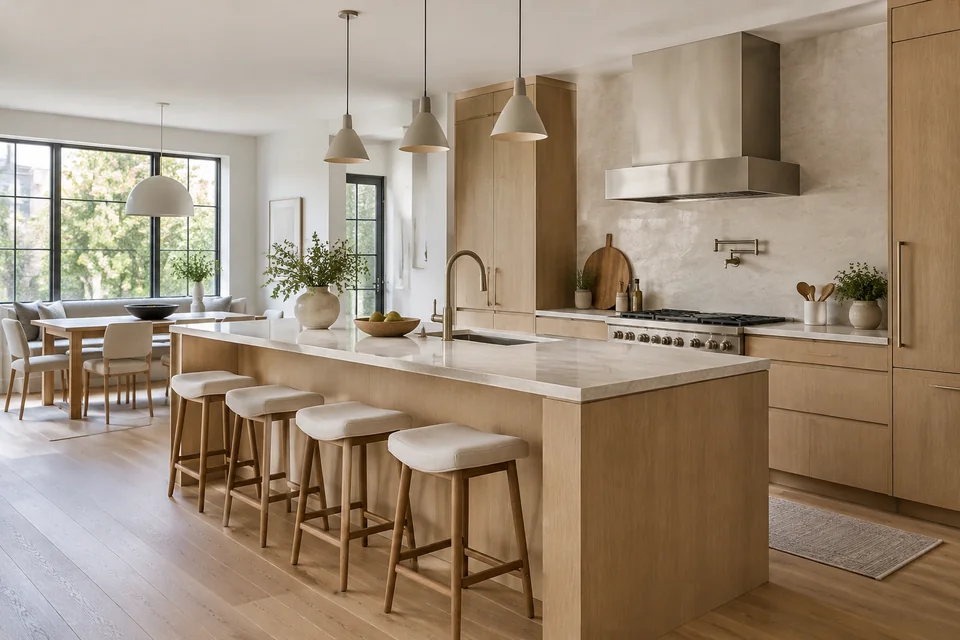
Both images are AI-generated. This example uses a general image-editing workflow, not a client project or a dedicated kitchen-workspace test.
Same room. A new material direction.
The brief asks for muted green cabinetry, pale stone and warmer metal finishes while retaining the main layout. Compare what changed before borrowing the idea.
Cabinet color changes the balance
Deep green fronts make the pale worktop stand out. Look at the island and tall cabinets together, rather than choosing a color from a small swatch.
Lighting changes how materials read
The edited image adds visible task lighting at the splashback. Judge the cabinet finish under the light your kitchen actually receives.
Check the details AI redraws
The extractor hood and stool arrangement also change. A request to preserve the room is guidance, not a geometry lock.
Read the actual editing brief
Edit this kitchen into a refined contemporary kitchen with deep muted green cabinetry, honed pale stone countertops and warm brushed brass fixtures. Keep camera viewpoint, all window and door positions, island footprint, sink and cooktop positions, walls, ceiling and room dimensions unchanged. Improve task lighting and use believable durable materials. Photorealistic architectural photography. No people, text, logo, watermark, collage or split screen.
A better brief starts with what stays.
Choose a direction, then adapt the suggested prompt to your own room. These are starting briefs, not additional tested results.
Suggested prompt
Redesign this kitchen with muted green cabinet fronts, pale stone countertops and brushed brass fixtures. Keep the camera viewpoint, window and door positions, island footprint, sink and cooktop positions. Keep the existing appliances. Add warm under-cabinet task lighting. Show a realistic kitchen design concept without people or text.
If your kitchen has little daylight, compare a lighter green before committing to a dark finish.
Give the AI a useful view of your kitchen.
A good source photo and a focused brief make the concept easier to judge.
Photograph the whole working area
Use an eye-level photo with cabinets, worktops, windows and appliances in view. Avoid panoramas, extreme wide angles and close crops.
Name the changes and the keepers
Start with cabinet color, countertop material or lighting. Explicitly list the sink, cooktop, appliances and openings you want to retain.
Review before you refine
Compare the concept with the original. Check openings, cabinet lines and appliance positions, then change one part of the brief at a time.
Kitchen design questions, answered.
Can I redesign my own kitchen from a photo?
Yes. Open the kitchen design workspace and upload a photo you have permission to use. Choose a style and describe the finishes or lighting you want to explore. Sign in when prompted to generate and sync your history.
Will AI keep the existing kitchen layout?
You can request that the sink, cooktop, doors, windows and island stay in place. AI may still alter their shapes or positions. Compare every result with the original; layout preservation is not guaranteed.
Can I change only the cabinet color?
Make the request specific: change the cabinet fronts to your chosen color, and retain the countertop, floor, appliances and camera viewpoint. The model can still redraw other details, so check the full image.
What works best for a small kitchen?
Use a photo that shows the full working area and explain which aisle and appliance positions must remain. Compare lighter fronts, reflective surfaces and task lighting as visual ideas. Do not infer usable clearance or dimensions from the generated image.
Is this a kitchen planner or a CAD tool?
This tool explores the appearance of a kitchen from a photograph. It does not create editable CAD, accurate floor plans or dimensioned cabinetry. Use measured drawings and professional advice for layout and installation decisions.
Are the example images real renovation projects?
No. The source scene and its redesign are AI-generated demonstration images. The editing brief is shown on this page. They illustrate a visual change and are not evidence of a built renovation or a dedicated kitchen-workspace result.
Find a direction for your own kitchen.
Bring a photo. Keep the details that matter. Explore the possibilities.
Design my kitchen